Step 1: Search Tab
This page is the starting point for searching professional profiles. Enter the name of the profile you are looking for in the search bar on the page and press Enter.

Step 2: Search by Filter
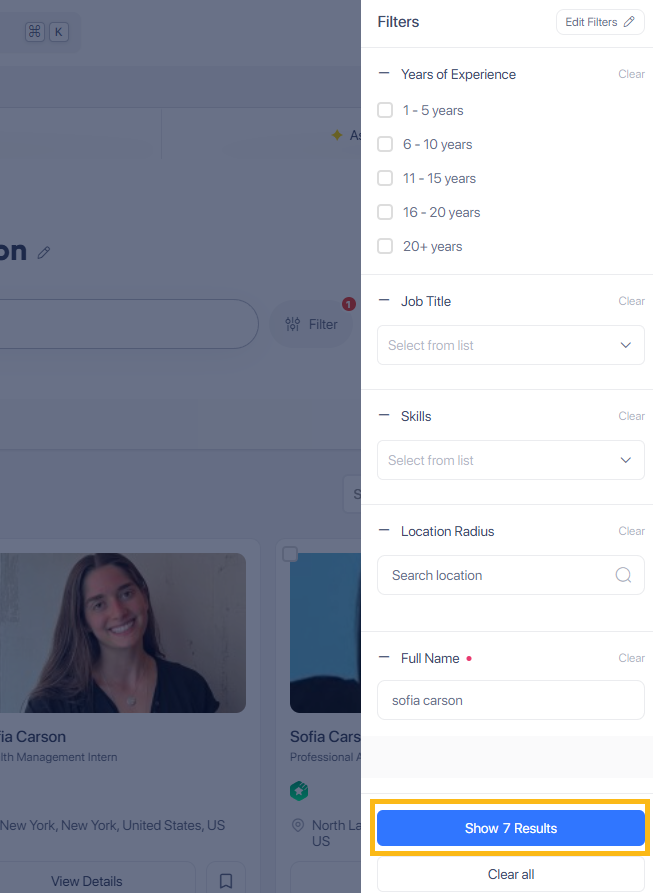
Click the filter icon next to the search tab, if you wish to get more accurate results. This action filters the profiles based on the specified criteria.

Step 3: Show Results
To proceed to the next step, click Show Results. Search filters help narrow down large datasets by allowing you to specify criteria such as Years of Experience, Job Title, Skills, Location Radius or Full Name. This not only saves time but also enhances the user experience by providing more accurate and personalized results.
Step 4: View Profile Details
After the search results are displayed, click on the View Details button for the profile you are interested in. This will take you to the detailed view of the selected professional profile.

